Labs
Problem 1:
12.10 (Shape Hierarchy) Implement the Shape hierarchy of Fig. 11.3. Omit the Triangle and Tetrahedron classes. Each TwoDimensionalShape should contain read-only abstract property Area to calculate the area of the two-dimensional shape. Each ThreeDimensionalShape should have readonly abstract properties Area and Volume to calculate the surface area and volume, respectively, of the three-dimensional shape. Create an app that uses an array of Shape references to objects of each concrete class in the hierarchy. Display a text description of the object to which each array element refers. Also, in the loop that processes all the shapes in the array, determine whether each shape is a TwoDimensionalShape or a ThreeDimensionalShape. If a shape is a TwoDimensionalShape, display its area. If a shape is a ThreeDimensionalShape, display its area and volume.
Problem 2:
Build the following:
Tuesday, March 29, 2016
Tuesday, March 15, 2016
Lesson 9
Outline
Chapter 12
Abstract Class
A C# abstract class contains abstract members which define what a derived should contain. These abstract members only declare that a member of a particular type is required, it does not implement the member. Implementation of abstract members takes place within the derived class. If a subclass which derives from an abstract class and fails to implement abstract methods will fail to compile.
In an abstract class, the abstract methods and abstract procedures are described but not defined.
abstract class Sample
{
public abstract int MyProperty { get; set; }
public abstract void DoSomething();
}
Note the addition of the keyword "abstract" in describing the class, property and method. It will be the responsibility of a derived class to implement the functionality described in the abstracted class.
class ImplementedSample : Sample
{
public override int MyProperty
{
get
{
throw new NotImplementedException();
}
set
{
throw new NotImplementedException();
}
}
public override void DoSomething()
{
throw new NotImplementedException();
}
}
When inheriting from an abstract class the concrete class must implement the design of the abstract class. A wizard can appear over the abstracted class name and stub out the abstraction requirements for us. Visual studio adds the NotImplementedException to remind us that the method or property code has not been defined.
An abstracted class can implement functionality as well that can be derived.
abstract class Sample
{
public abstract int MyProperty { get; set; }
public abstract void DoSomething();
public void DoSomethingElse()
{
//This is where I would put code
}
}
The DoSomethingElse() method has code and is functional. Any derived class can call this method. The method functionality cannot be changed in the derived class.
Virtual
So far we have only looked at abstract class members. As discussed above an abstract member is not implemented in the base class and must be implemented in derived classes in order for the class to compile.
Another type of member is a virtual member. A member defined as virtual must be implemented in the base class, but may be optionally overridden in the derived class if different behavior is required.
Lets add a virtual method to the abstract class.
abstract class Sample
{
public abstract int MyProperty { get; set; }
public abstract void DoSomething();
public void DoSomethingElse()
{
//This is where I would put code
}
public virtual void StillDoSomethingElse()
{
//This code can the overridden and changed in the derived class.
//If not overridden, then this code will run when the method is called.
}
}
Introducing the virtual keyword allows us to change the behavior of the method downstream in a derived class.
Lets look at the implementation.
class ImplementedSample : Sample
{
public override int MyProperty
{
get
{
throw new NotImplementedException();
}
set
{
throw new NotImplementedException();
}
}
public override void DoSomething()
{
throw new NotImplementedException();
}
public override void StillDoSomethingElse()
{
//By using the override keyword on this method
//the code here will run instead of the base abstract method code
}
}
By allowing us to change the behavior of the method through overriding each derived class can use its own implementation of the virtual method or default to the method as defined.
Implementing abstract classes allow us to define behavior in the derived classes and implement behavior change when necessary.
Chapter 12
Abstract Class
A C# abstract class contains abstract members which define what a derived should contain. These abstract members only declare that a member of a particular type is required, it does not implement the member. Implementation of abstract members takes place within the derived class. If a subclass which derives from an abstract class and fails to implement abstract methods will fail to compile.
In an abstract class, the abstract methods and abstract procedures are described but not defined.
abstract class Sample
{
public abstract int MyProperty { get; set; }
public abstract void DoSomething();
}
Note the addition of the keyword "abstract" in describing the class, property and method. It will be the responsibility of a derived class to implement the functionality described in the abstracted class.
class ImplementedSample : Sample
{
public override int MyProperty
{
get
{
throw new NotImplementedException();
}
set
{
throw new NotImplementedException();
}
}
public override void DoSomething()
{
throw new NotImplementedException();
}
}
When inheriting from an abstract class the concrete class must implement the design of the abstract class. A wizard can appear over the abstracted class name and stub out the abstraction requirements for us. Visual studio adds the NotImplementedException to remind us that the method or property code has not been defined.
An abstracted class can implement functionality as well that can be derived.
abstract class Sample
{
public abstract int MyProperty { get; set; }
public abstract void DoSomething();
public void DoSomethingElse()
{
//This is where I would put code
}
}
The DoSomethingElse() method has code and is functional. Any derived class can call this method. The method functionality cannot be changed in the derived class.
Virtual
So far we have only looked at abstract class members. As discussed above an abstract member is not implemented in the base class and must be implemented in derived classes in order for the class to compile.
Another type of member is a virtual member. A member defined as virtual must be implemented in the base class, but may be optionally overridden in the derived class if different behavior is required.
Lets add a virtual method to the abstract class.
abstract class Sample
{
public abstract int MyProperty { get; set; }
public abstract void DoSomething();
public void DoSomethingElse()
{
//This is where I would put code
}
public virtual void StillDoSomethingElse()
{
//This code can the overridden and changed in the derived class.
//If not overridden, then this code will run when the method is called.
}
}
Introducing the virtual keyword allows us to change the behavior of the method downstream in a derived class.
Lets look at the implementation.
class ImplementedSample : Sample
{
public override int MyProperty
{
get
{
throw new NotImplementedException();
}
set
{
throw new NotImplementedException();
}
}
public override void DoSomething()
{
throw new NotImplementedException();
}
public override void StillDoSomethingElse()
{
//By using the override keyword on this method
//the code here will run instead of the base abstract method code
}
}
By allowing us to change the behavior of the method through overriding each derived class can use its own implementation of the virtual method or default to the method as defined.
Implementing abstract classes allow us to define behavior in the derived classes and implement behavior change when necessary.
Tuesday, March 8, 2016
Lesson 8
Outline
Chapter 12
Polymorphism
Another primary concept of object-oriented programming is Polymorphism. It allows you to invoke derived class methods through a base class reference during run-time. This is handy when you need to assign a group of objects to an array and then invoke each of their methods. They won't necessarily have to be the same object type.
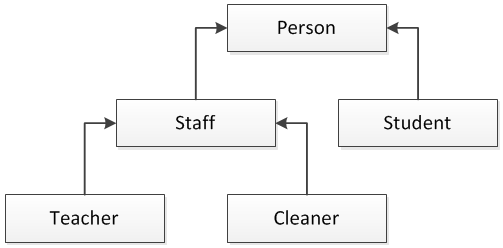
In a previous lesson we discussed the inheritance aspects of the diagram above. Below is the code that supports the diagram above with a few properties to illustrate polymorphic behavior.
class Person
{
public string FirstName { get; set; }
public string LastName { get; set; }
public string FullName
{
get { return FirstName + " " + LastName; }
}
}
class Staff : Person
{
public int PayGrade { get; set; }
}
class Student : Person
{
public string Major { get; set; }
}
class Teacher : Staff
{
public string OfficeLocation { get; set; }
}
class Cleaner : Staff
{
public int WeeklyHours { get; set; }
}
Polymorphism allows one object to "behave" like another in its inheritance tree. So in the above hierarchy a "teacher" object could behave like a "staff" object.
Suppose we had a method that took a staff object:
public class Utilities
{
public void WorkWithStaff(Staff staffMember)
{
PayGrade = 5;
}
}
We could do the following:
Staff myStaff = new Staff();
Utilities myUtil = new Utilities();
myUtil.WorkWithStaff(myStaff);
Since myStaff is of type Staff then we can pass that object in as a parameter to our method. But due to the rules of polymorphism we can do this too:
Teacher myTeacher = new Teacher();
Utilities myUtil = new Utilities();
myUtil.WorkWithStaff(myTeacher );
Because Teacher has Staff in the object inheritance tree we can do this. Note, this only works upstream so Teacher can be Staff but Staff cannot be Teacher.
Also, while in the method WorkWithStaff, all objects passed into the method will behave as a staff object. In other words, inside the method we would not be able to access any of the Teacher attributes.
Polymorphism is a big topic. We will revisit this topic in a future lesson..
Chapter 12
Polymorphism
Another primary concept of object-oriented programming is Polymorphism. It allows you to invoke derived class methods through a base class reference during run-time. This is handy when you need to assign a group of objects to an array and then invoke each of their methods. They won't necessarily have to be the same object type.
In a previous lesson we discussed the inheritance aspects of the diagram above. Below is the code that supports the diagram above with a few properties to illustrate polymorphic behavior.
class Person
{
public string FirstName { get; set; }
public string LastName { get; set; }
public string FullName
{
get { return FirstName + " " + LastName; }
}
}
class Staff : Person
{
public int PayGrade { get; set; }
}
class Student : Person
{
public string Major { get; set; }
}
class Teacher : Staff
{
public string OfficeLocation { get; set; }
}
class Cleaner : Staff
{
public int WeeklyHours { get; set; }
}
Polymorphism allows one object to "behave" like another in its inheritance tree. So in the above hierarchy a "teacher" object could behave like a "staff" object.
Suppose we had a method that took a staff object:
public class Utilities
{
public void WorkWithStaff(Staff staffMember)
{
PayGrade = 5;
}
}
We could do the following:
Staff myStaff = new Staff();
Utilities myUtil = new Utilities();
myUtil.WorkWithStaff(myStaff);
Since myStaff is of type Staff then we can pass that object in as a parameter to our method. But due to the rules of polymorphism we can do this too:
Teacher myTeacher = new Teacher();
Utilities myUtil = new Utilities();
myUtil.WorkWithStaff(myTeacher );
Because Teacher has Staff in the object inheritance tree we can do this. Note, this only works upstream so Teacher can be Staff but Staff cannot be Teacher.
Also, while in the method WorkWithStaff, all objects passed into the method will behave as a staff object. In other words, inside the method we would not be able to access any of the Teacher attributes.
Polymorphism is a big topic. We will revisit this topic in a future lesson..
Tuesday, February 16, 2016
Lesson 7
Outline
Chapter 11
Inheritance Continued (Lab)
Chapter 11
Inheritance Continued (Lab)
Problem 11.7 & 11.8
11.7 (Quadrilateral Inheritance Hierarchy) Write an inheritance hierarchy for classes Quadrilateral, Trapezoid, Parallelogram, Rectangle and Square. Use Quadrilateral as the base class of the hierarchy. Make the hierarchy as deep (i.e., as many levels) as possible. Specify the instance variables, properties and methods for each class. The private instance variables of Quadrilateral should be the x–y coordinate pairs for the four endpoints of the Quadrilateral. Write an app that instantiates objects of your classes and outputs each object’s area (except Quadrilateral).
11.8 (Account Inheritance Hierarchy) Create an inheritance hierarchy that a bank might use to represent customers’ bank accounts. All customers at this bank can deposit (i.e., credit) money into their accounts and withdraw (i.e., debit)money from their accounts. More specific types of accounts also exist. Savings accounts, for instance, earn interest on the money they hold. Checking accounts, on the other hand, charge a fee per transaction.
Create base class Account and derived classes SavingsAccount and CheckingAccount that inherit from class Account. Base class Account should include one private instance variable of type decimal to represent the account balance. The class should provide a constructor that receives an initial balance and uses it to initialize the instance variable with a public property. The property should validate the initial balance to ensure that it’s greater than or equal to 0.0; if not, throw an exception. The class should provide two public methods. Method Credit should add an amount to the current balance. Method Debit should withdraw money from the Account and ensure that the debit amount does not exceed the Account’s balance. If it does, the balance should be left unchanged, and the method should display the message "Debit amount exceeded account balance." The class should also provide a get accessor in property Balance that returns the current balance.
Derived class SavingsAccount should inherit the functionality of an Account, but also include a decimal instance variable indicating the interest rate (percentage) assigned to the Account. SavingsAccount’s constructor should receive the initial balance, as well as an initial value for the interest rate. SavingsAccount should provide public method CalculateInterest that returns a decimal indicating the amount of interest earned by an account. Method CalculateInterest should determine this amount by multiplying the interest rate by the account balance. [Note: SavingsAccount should inherit methods Credit and Debit without redefining them.]
Derived class CheckingAccount should inherit from base class Account and include a decimal instance variable that represents the fee charged per transaction. CheckingAccount’s constructor should receive the initial balance, as well as a parameter indicating a fee amount. Class Checking-Account should redefine methods Credit and Debit so that they subtract the fee from the account balance whenever either transaction is performed successfully. CheckingAccount’s versions of these methods should invoke the base-class Account version to perform the updates to an account balance.
CheckingAccount’s Debit method should charge a fee only if money is actually withdrawn (i.e., the debit amount does not exceed the account balance). [Hint: Define Account’s Debit method so that it returns a bool indicating whether money was withdrawn. Then use the return value to determine whether a fee should be charged.]
After defining the classes in this hierarchy, write an app that creates objects of each class and tests their methods. Add interest to the SavingsAccount object by first invoking its CalculateInterest method, then passing the returned interest amount to the object’s Credit method.
11.7 (Quadrilateral Inheritance Hierarchy) Write an inheritance hierarchy for classes Quadrilateral, Trapezoid, Parallelogram, Rectangle and Square. Use Quadrilateral as the base class of the hierarchy. Make the hierarchy as deep (i.e., as many levels) as possible. Specify the instance variables, properties and methods for each class. The private instance variables of Quadrilateral should be the x–y coordinate pairs for the four endpoints of the Quadrilateral. Write an app that instantiates objects of your classes and outputs each object’s area (except Quadrilateral).
11.8 (Account Inheritance Hierarchy) Create an inheritance hierarchy that a bank might use to represent customers’ bank accounts. All customers at this bank can deposit (i.e., credit) money into their accounts and withdraw (i.e., debit)money from their accounts. More specific types of accounts also exist. Savings accounts, for instance, earn interest on the money they hold. Checking accounts, on the other hand, charge a fee per transaction.
Create base class Account and derived classes SavingsAccount and CheckingAccount that inherit from class Account. Base class Account should include one private instance variable of type decimal to represent the account balance. The class should provide a constructor that receives an initial balance and uses it to initialize the instance variable with a public property. The property should validate the initial balance to ensure that it’s greater than or equal to 0.0; if not, throw an exception. The class should provide two public methods. Method Credit should add an amount to the current balance. Method Debit should withdraw money from the Account and ensure that the debit amount does not exceed the Account’s balance. If it does, the balance should be left unchanged, and the method should display the message "Debit amount exceeded account balance." The class should also provide a get accessor in property Balance that returns the current balance.
Derived class SavingsAccount should inherit the functionality of an Account, but also include a decimal instance variable indicating the interest rate (percentage) assigned to the Account. SavingsAccount’s constructor should receive the initial balance, as well as an initial value for the interest rate. SavingsAccount should provide public method CalculateInterest that returns a decimal indicating the amount of interest earned by an account. Method CalculateInterest should determine this amount by multiplying the interest rate by the account balance. [Note: SavingsAccount should inherit methods Credit and Debit without redefining them.]
Derived class CheckingAccount should inherit from base class Account and include a decimal instance variable that represents the fee charged per transaction. CheckingAccount’s constructor should receive the initial balance, as well as a parameter indicating a fee amount. Class Checking-Account should redefine methods Credit and Debit so that they subtract the fee from the account balance whenever either transaction is performed successfully. CheckingAccount’s versions of these methods should invoke the base-class Account version to perform the updates to an account balance.
CheckingAccount’s Debit method should charge a fee only if money is actually withdrawn (i.e., the debit amount does not exceed the account balance). [Hint: Define Account’s Debit method so that it returns a bool indicating whether money was withdrawn. Then use the return value to determine whether a fee should be charged.]
After defining the classes in this hierarchy, write an app that creates objects of each class and tests their methods. Add interest to the SavingsAccount object by first invoking its CalculateInterest method, then passing the returned interest amount to the object’s Credit method.
Lesson 6
Outline
Chapter 11
Inheritance Continued
Diagraming
Is-A relationship
Constructors
Protected
Problem 11.5
Protected
Problem 11.5
(Shape Inheritance Hierarchy) The world of shapes is much richer than the shapes included in the inheritance hierarchy of Fig. 11.3. Write down all the shapes you can think of—both two-dimensional and three-dimensional—and form them into a more complete Shape hierarchy with as many levels as possible. Your hierarchy should have class Shape at the top. Class TwoDimensionalShape and class ThreeDimensionalShape should extend Shape. Add additional derived classes, such as Quadrilateral and Sphere, at their correct locations in the hierarchy as necessary.
Diagraming
In the previous lesson, we learned about base and derived classes where the base class is the parent class and the derived class is the child class. A derived class can only have one base class. In order for a derived class to inherit from more than one base class the current base class would need to inherit from second class. However, a base class can have many derived classes.
In the example below, we have a simple diagram outlining a series of classes and their inherited relationship. The top class Person is the root base class for all the other classes. All of the other classes in the inheritance diagram have the public and internal capabilities specified in the Person class.
The Staff base class has two derived classes (Teacher and Cleaner). Both will have the same capabilities outlined in the Staff class but can also contain separate properties and methods specific to their own class. In an inheritance diagram the arrows point back to the base class.
Is-A
Is-A is a phrase used to describe inherited relationships. In the previous diagram, you can say Staff Is-A Person and Teacher Is-A Staff. This relationship only works up the inheritance hierarchy. We can say Teacher is a Staff but cannot say staff is a teacher. So all teachers are staff but not all staff are teachers.
Constructors
Earlier in the lessons we talked about class constructors and their ability to accept values passed into the class when the class is instantiated into an object.
Suppose the staff class did not have a default constructor and only supported constructors that took one or more values?
class Staff { private readonly string payGrade = string.Empty; public Staff(string payGrade) { //Update private variable to specified pay grade this.payGrade = payGrade; } }
Our Teacher class is derived from the Staff class.
class Teacher:Staff { }
This will cause an exception. Since Staff cannot be created without the pay grade parameter the Teacher class must have at least one constructor to support the Staff class requirement.
class Teacher:Staff { public Teacher(string payGrade) : base(payGrade) { } }
The Teacher class accepts the parameters via its constructor and then passes it to the base class (Staff) via the : base. The "base" refers to the current class base class. The Teacher class can still accept its own parameters.
private string className = string.Empty; public Teacher(string className, string payGrade) : base(payGrade) { this.className = className; }
In the example above, the Teacher class accepts two parameters (className and payGrade). Pay grade is passed to the base constructor and the class name is handled locally within the Teacher class. Note: the sequence of the parameters does not play a factor. It would have been acceptable to reverse the order of the parameters.
Lets extend our Teacher class to support multiple constructors.
class Teacher:Staff { private string className = string.Empty; private string firstName = string.Empty; private string lastName = string.Empty; public Teacher(string className, string payGrade) : base(payGrade) { this.className = className; } public Teacher(string firstName, string lastName, string className, string payGrade): this(className, payGrade) { this.firstName = firstName; this.lastName = lastName; } }
The Teacher class now supports to separate constructors to instantiate the class into a object but only one constructor references the base class. With the use of constructor chaining we can call the other Teacher constructor and pass in the values collected from this constructor. Constructor chaining is acceptable as long as ultimately the base class constructor require is satisfied.
Protected
Private and Protected are very similar. Both cannot be accessed via an instantiated object. Both can be seen by their peer methods within the same brackets "{}". However, there is one main distinction. Private variables and methods can only be seen within the class. Protected variables and methods can be referenced in the derived class.
class Staff { private readonly string payGrade = string.Empty; protected int Age; public Staff(string payGrade) { //Update private variable to this.payGrade = payGrade; } }
class Teacher:Staff { private string className = string.Empty; private string firstName = string.Empty; private string lastName = string.Empty; public Teacher(string className, string payGrade) : base(payGrade) { this.className = className; } public Teacher(string firstName, string lastName, string className, string payGrade): this(className, payGrade) { this.firstName = firstName; this.lastName = lastName; Age = 27; } }
The Age variable is accessible in the Teacher class due to the protected description. Note: Protected is only accessible in the immediate derived class. In the diagram at the top, should Person have a protected variable or method, it would be accessible in the Staff class but NOT in the Teacher or Cleaner class.
Lesson 5
Chapter 11
Inheritance
Base Classes
Derived Classes
Inheritance
Inheritance enables you to create new classes that reuse, extend, and modify the behavior that is defined in other classes. The class whose members are inherited is called the base class, and the class that inherits those members is called the derived class. A derived class can have only one direct base class. However, inheritance is transitive. If ClassC is derived from ClassB, and ClassB is derived from ClassA, ClassC inherits the public or internal members declared in ClassB and ClassA.
Each derived class is generally a specific version of the parent or base class. If we created a Vehicle class and then derived Car class from Vehicle class. The Car class would have access to all public or internal properties and methods of the Vehicle class.
public class Vehicle
{public int NumberOfDoors { get; set; }
public string Transmission { get; set; }
}
public class Car : Vehicle
{public bool Convertable { get; set; }
public bool HasTrunk { get; set; }
}
Class inheritance is denoted by a colon (:) separating the current class name from the base class name. public class Car : Vehicle tells us that Car is derived from Vehicle. Vehicle is the base class and Car is the derived class. Since the Car class is derived from Vehicle we can say that all Cars are Vehicles but not all Vehicles are Cars. Inheritance only works downstream and inheriting a base class does not change the base class. But any change to the base class will be reflected in the derived class.
Car myCar = new Car();
myCar.Convertable = true;
myCar.NumberOfDoors = 2;Above we created an instance of the Car class and called the object myCar. We then changed the property values of myCar. If you look closely, we changed the convertible property value which is located in the Car class and then changed the property value of the NumberOfDoors property from the Vehicle class. The code looks exactly the same. The myCar class does not care which level a property or method is defined only whether it is available (public or internal) or not (private).
Multiple class can be derived
We can create multiple classes based on a parent class.
public class Car : Vehicle
{public bool Convertable { get; set; }
public bool HasTrunk { get; set; }
}
public class Truck : Vehicle
{public bool TowPackage { get; set; }
public bool FourWheelDrive { get; set; }
}
Both of the above classes are derived from the same class (Vehicle), Even though they contain different properties they have the same base class. It can be read like this "All cars are vehicles but not all vehicles are cars"
Base Classes
A base class is a class that is used to create, or derive, other classes. Classes derived from a base class are called child classes, subclasses or derived classes. A base class does not inherit from any other class and is considered parent of a derived class.
The base class forms the means by which inheritance is accomplished through derivation. A class derived from a base class inherits both data and behavior. For example, vehicle can be a base class from which the derived classes car and bus can be derived. Both car and bus are vehicles, and they each represent their own specializations of base class.
Base class helps to create a specialized class that can reuse the code that is implicitly gained from the base class (except constructors and destructors) and extend the functionality of base class by adding or overriding members relevant to derived class in derived class. In C#, events are declared in base class that can be raised from derived classes. Generic classes that are used to encapsulate operations that are not specific to a particular data type serve as base classes, providing generic behavior so as to achieve flexibility and code reusability.
Derived Classes
A derived class is a class created, or derived from another existing class. The existing class from which the derived class gets created through inheritance is known as base or super class.
While inheriting from base class, the derived class implicitly inherits all the members (except constructors and destructors) which it reuses, extends and modifies the behavior of the base class. The derived class overrides the properties and methods of the base class so that it represents the specialized version of base class. C# provides ability to override and hide methods of base class in derived class which makes both classes to evolve freely and maintain binary compatibility.
Inheritance is one of the key functionalities required for all object oriented programming languages.
Tuesday, February 9, 2016
Lesson 4
Outline
Chapter 10
Override Methods
ToString()
Garbage Collection
Object Initializers
Override Methods
An override method provides a new implementation of a member that is inherited from a base class. The method that is overridden by an override declaration is known as the overridden base method.
The overridden base method must have the same signature as the override method.
You cannot override a non-virtual or static method. The overridden base method must be virtual, abstract, or override.
An override declaration cannot change the accessibility of the virtual method. Both the override method and the virtual method must have the same access level modifier.
You cannot use the new, static, or virtual modifiers to modify an override method
.
An overriding property declaration must specify exactly the same access modifier, type, and name as the inherited property, and the overridden property must be virtual, abstract, or override.
class Person
{
public virtual string SaveDay()
{
return "Day Saved";
}
}
class Student : Person
{
public override string SaveDay()
{
return "Day is Lost";
}
}
In the above example we have two classes (Person and Student) The Person class contains a virtual method SaveDay that returns a string value "Day Saved". The Student class above inherits from Person. If we did nothing else the Student class would behave exactly like the Person class. However, in the Student class we have chosen to override the SaveDay() method. We can do this because of the virtual designation in the base class. By using the override designation we can change how the method behaves in the derived class. Note that the SaveDay() method in the Student class returns "Day is Lost". If we created two object based of these classes myPersom and myStudent, both would have the same methods but the method themselves would behave differently.
ToString()
Object.ToString is the major formatting method in the .NET Framework. It converts an object to its string representation so that it is suitable for display.
Classes frequently override the Object.ToString method to provide a more suitable string representation of a particular type. Types also frequently overload the Object.ToString method to provide support for format strings or culture-sensitive formatting.
public class Vehicle
{
public string Make { get; set; }
public string Model { get; set; }
public override string ToString()
{
return Make + " " + Model;
}
}
In this class we have two properties to collect the make and model of our vehicle. We added the override ToString()method to change its behavior within the vehicle class.
static void Main(string[] args)
{
Vehicle myCar = new Vehicle();
myCar.Make = "Dodge";
myCar.Model = "Charger";
Console.WriteLine("My Car is a " + myCar.ToString());
}
Our implementation of the Vehicle class (myCar) has the properties set to Dodge and Charger. When we call the ToString() method of the object it will return "Dodge Charger" because we have changed the way the ToString() works in the Vehicle class.
Garbage Collection
The .NET Framework's garbage collector manages the allocation and release of memory for your application. Each time you create a new object, the common language runtime allocates memory for the object from the managed heap. As long as address space is available in the managed heap, the runtime continues to allocate space for new objects. However, memory is not infinite. Eventually the garbage collector must perform a collection in order to free some memory. The garbage collector's optimizing engine determines the best time to perform a collection, based upon the allocations being made. When the garbage collector performs a collection, it checks for objects in the managed heap that are no longer being used by the application and performs the necessary operations to reclaim their memory.
Object Initializers
Object initializers let you assign values to any accessible fields or properties of an object at creation time without having to explicitly invoke a constructor.
In our myCar implementation above we set the value of the Make and Model class implicitly. In using object initializers we could do the following:
Vehicle myCar = new Vehicle() { Make = "Dodge", Model = "Charger" }
This is functionally the same as our previous sample but reduces the lines of code in our project. There are no hard and fast rules on when to use one approach over another. Choose which you are comfortable with and be consistent.


Chapter 10
Override Methods
ToString()
Garbage Collection
Object Initializers
Override Methods
An override method provides a new implementation of a member that is inherited from a base class. The method that is overridden by an override declaration is known as the overridden base method.
The overridden base method must have the same signature as the override method.
You cannot override a non-virtual or static method. The overridden base method must be virtual, abstract, or override.
An override declaration cannot change the accessibility of the virtual method. Both the override method and the virtual method must have the same access level modifier.
You cannot use the new, static, or virtual modifiers to modify an override method
.
An overriding property declaration must specify exactly the same access modifier, type, and name as the inherited property, and the overridden property must be virtual, abstract, or override.
class Person
{
public virtual string SaveDay()
{
return "Day Saved";
}
}
class Student : Person
{
public override string SaveDay()
{
return "Day is Lost";
}
}
In the above example we have two classes (Person and Student) The Person class contains a virtual method SaveDay that returns a string value "Day Saved". The Student class above inherits from Person. If we did nothing else the Student class would behave exactly like the Person class. However, in the Student class we have chosen to override the SaveDay() method. We can do this because of the virtual designation in the base class. By using the override designation we can change how the method behaves in the derived class. Note that the SaveDay() method in the Student class returns "Day is Lost". If we created two object based of these classes myPersom and myStudent, both would have the same methods but the method themselves would behave differently.
ToString()
Object.ToString is the major formatting method in the .NET Framework. It converts an object to its string representation so that it is suitable for display.
Classes frequently override the Object.ToString method to provide a more suitable string representation of a particular type. Types also frequently overload the Object.ToString method to provide support for format strings or culture-sensitive formatting.
public class Vehicle
{
public string Make { get; set; }
public string Model { get; set; }
public override string ToString()
{
return Make + " " + Model;
}
}
In this class we have two properties to collect the make and model of our vehicle. We added the override ToString()method to change its behavior within the vehicle class.
static void Main(string[] args)
{
Vehicle myCar = new Vehicle();
myCar.Make = "Dodge";
myCar.Model = "Charger";
Console.WriteLine("My Car is a " + myCar.ToString());
}
Our implementation of the Vehicle class (myCar) has the properties set to Dodge and Charger. When we call the ToString() method of the object it will return "Dodge Charger" because we have changed the way the ToString() works in the Vehicle class.
Garbage Collection
The .NET Framework's garbage collector manages the allocation and release of memory for your application. Each time you create a new object, the common language runtime allocates memory for the object from the managed heap. As long as address space is available in the managed heap, the runtime continues to allocate space for new objects. However, memory is not infinite. Eventually the garbage collector must perform a collection in order to free some memory. The garbage collector's optimizing engine determines the best time to perform a collection, based upon the allocations being made. When the garbage collector performs a collection, it checks for objects in the managed heap that are no longer being used by the application and performs the necessary operations to reclaim their memory.
Object Initializers
Object initializers let you assign values to any accessible fields or properties of an object at creation time without having to explicitly invoke a constructor.
In our myCar implementation above we set the value of the Make and Model class implicitly. In using object initializers we could do the following:
Vehicle myCar = new Vehicle() { Make = "Dodge", Model = "Charger" }
This is functionally the same as our previous sample but reduces the lines of code in our project. There are no hard and fast rules on when to use one approach over another. Choose which you are comfortable with and be consistent.
Subscribe to:
Posts (Atom)